Your Meta CAPI Is Probably Double-Counting Conversions. Here's How to Check.
You set up CAPI and conversions went up. But are they real? If Meta shows more purchases than Shopify, you're double-counting. Here's the exact fix in 6 steps.
Your Meta CAPI Is Probably Double-Counting Conversions. Here's How to Check.
Here's a scenario that happens more often than anyone admits.
You set up CAPI. Your conversion numbers in Meta go up noticeably. You feel good. Your ROAS improves. You scale your budget.
Then, three weeks later, you open Shopify. 847 orders. You open Meta. 1,391 purchases.
That's not attribution recovery. That's double-counting. And scaling your ad spend based on a number that's 60% inflated is one of the most expensive mistakes you can make in paid media - because the algorithm is learning from fiction.
This post explains exactly why it happens, three ways to confirm it's happening to you, and the precise fix.
First, Understand Why This Happens At All
When you run Meta Pixel alongside CAPI - which is the correct, recommended setup - both systems fire on the same purchase. The Pixel fires from the customer's browser when they land on your thank-you page. CAPI fires from your server when the order is processed.
Two signals. One purchase. Meta's system is designed for this.
The mechanism that handles it is called deduplication. When Meta receives a browser event and a server event that represent the same purchase, it counts them once. Clean, correct, no inflation.
But - and this is the problem - deduplication only works when it has something to match on.
That something is a field called event_id. A unique identifier you assign to each purchase, sent with both the Pixel event and the CAPI event. When Meta sees the same event_id on both events, it knows: same purchase, count once.
When event_id is missing - or when both events send different values - Meta has no way to recognize they're the same purchase. Two separate signals arrive. Meta counts both. One real sale becomes two reported conversions.
That's the whole problem. And it's 100% a configuration issue, not a Meta bug.
How to Tell If You're Currently Double-Counting
Don't assume. Check. Here are three ways, from fastest to most definitive.
Check 1: The Shopify vs Meta Sanity Test (2 minutes)
Pull the last 30 days. Open Shopify orders. Open Meta Ads Manager → Purchase conversions (7-day click, 1-day view attribution).
These numbers will never match perfectly - attribution differences, organic orders, and returning customers create a gap. But the gap should go one direction: Meta lower than Shopify, not higher.
Meta missing some conversions = normal. Tracking loss from iOS, ad blockers. Meta showing more conversions than actual orders = double-counting.
If Meta's number is 15% or more above your actual order count, stop what you're doing. This is the problem.
Check 2: Events Manager Deduplication Column (3 minutes)
Open Meta Events Manager → your Pixel → Events tab → click Purchase.
Look for the Deduplication column. Meta shows here how many events were deduplicated vs. counted separately. A healthy setup with both Pixel and CAPI running should show a deduplication rate close to 100% - meaning almost every browser event is being matched to its server counterpart.
If the column shows low deduplication or isn't showing at all, Meta is treating your Pixel and CAPI events as separate conversions. That's your confirmation.
Check 3: Test Events — The Definitive Check (5 minutes)
This is the most reliable method. Go to Meta Events Manager → Test Events.
Open your store in a new tab. Complete a test purchase (use a discount code to zero the cost, or use Shopify's test payment gateway).
In the Test Events panel, watch the events arrive in real time. For a correctly configured setup, you should see:
✅ One Purchase event — Source: Browser
✅ One Purchase event — Source: Server
✅ Both events show the same
event_idvalue✅ Total conversion count: 1, not 2
If both events show up but the event_id values are different - or missing entirely - and the conversion count shows 2, you're double-counting. Go straight to the fix below.
The Fix: Getting event_id Right
The fix requires one event_id value, generated once per purchase, is sent identically to both your Pixel tag and your CAPI tag. Here's exactly how to do it in GTM.
Step 1: Get the Event ID Variable from the Community Template Gallery
In your web GTM container, go to Variables in the left sidebar. Scroll to the bottom of the page and click "Discover more variable types in the Community Template Gallery."
In the search bar, type Event ID. You'll find a ready-made Event ID variable template. Click it and add it to your workspace.
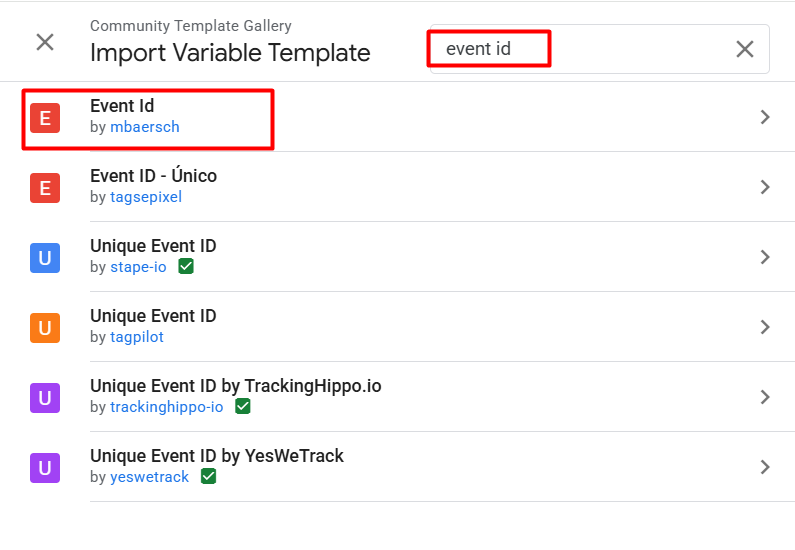
That's it. No custom JavaScript needed. No manual data layer mapping. The template pulls a unique, consistent event ID for each interaction - the same value whether it's read by your Pixel tag or your CAPI tag, which is exactly what deduplication needs.
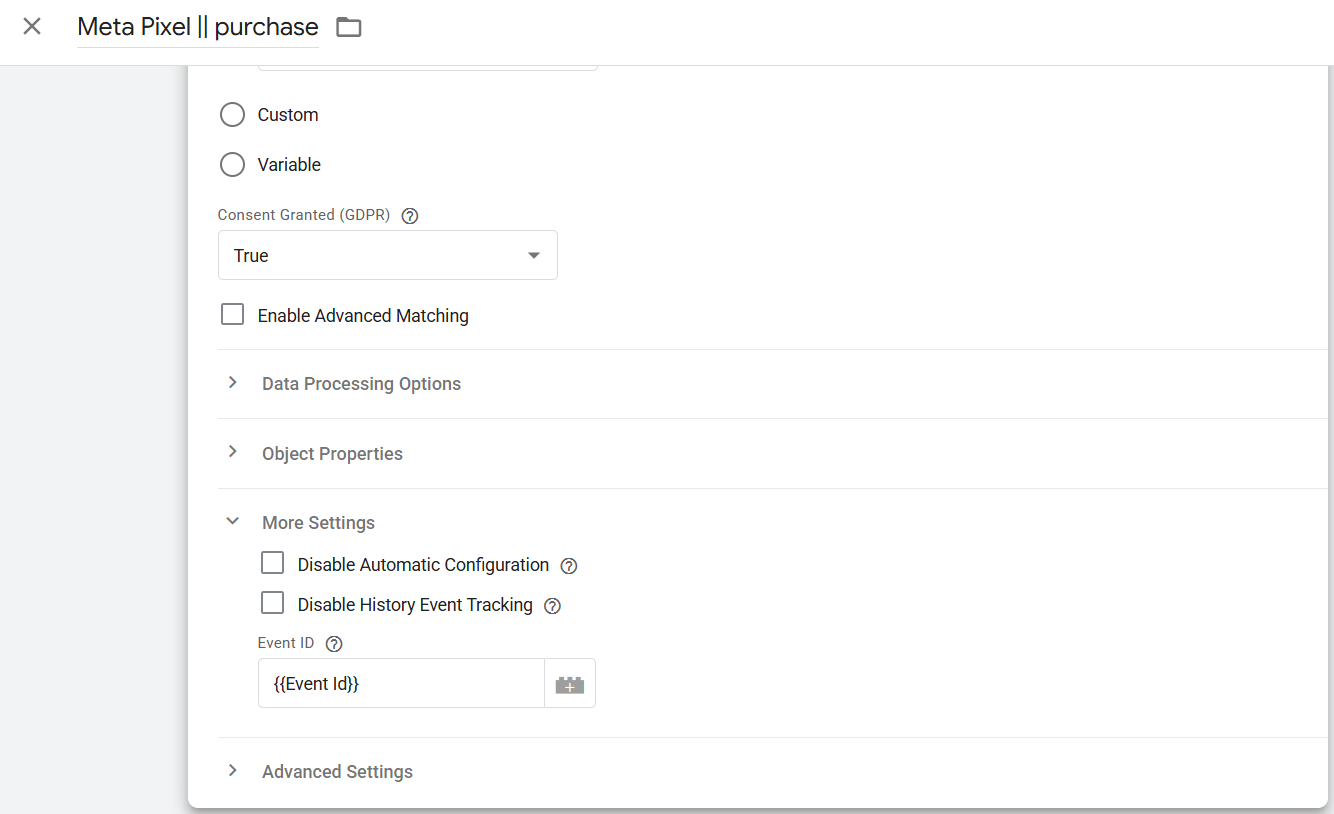
Step 2: Add event_id to your Web Pixel Tag
In your web GTM container, open your Meta Pixel purchase tag. In the event parameters section, add:
Step 3: Add event_id to your GA4 Event Tags (Web Container)
Still in your web GTM container, open each of your GA4 event tags — especially the purchase event tag. In the event parameters section, add the same variable:
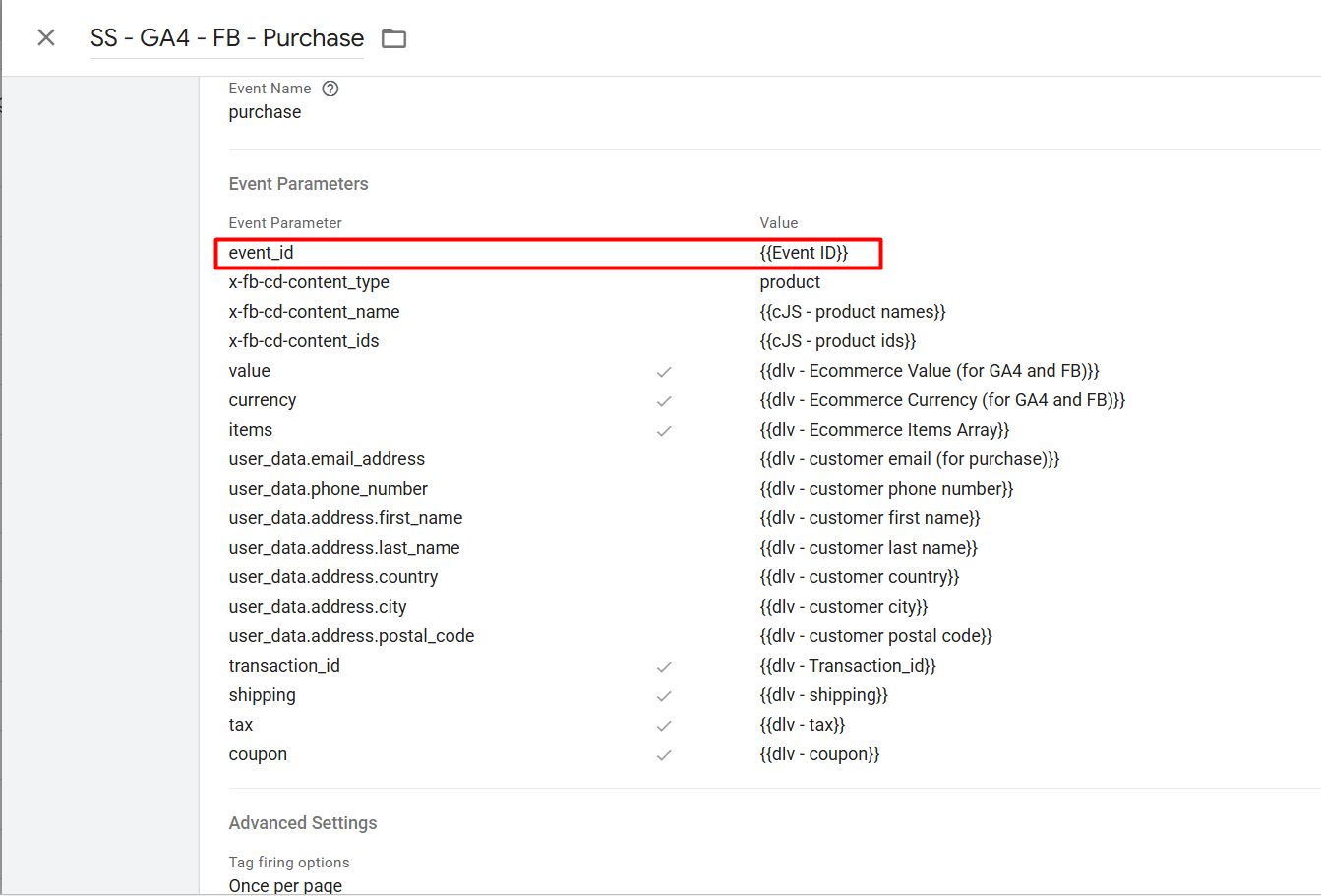
This is the step that carries event_id to your server container. The GA4 tag is what forwards data from your web container to the server container. By adding event_id to the GA4 event parameters, it travels automatically with every event sent to the server - no separate variable setup needed in the server container.
This is the correct flow:
Web Container (GA4 tag with event_id)
        ↓ forwards all event data including event_id
Server Container (receives event_id from incoming GA4 data)
        ↓ maps incoming event_id to CAPI tag
Meta CAPI (sends event_id to Meta)
Step 4 (Server Container): Map the Incoming event_id to your CAPI Tag
Now switch to your GTM server container. Open your Facebook CAPI tag.
You do not need to add the Event ID variable here - it doesn't exist in the server container. Instead, the event_id already arrived from your web container via the GA4 event data.
In the CAPI tag event parameters, map the incoming field:
Parameter Name: event_id
Value: map from incoming event data → event_id
In the server container, this is typically done by selecting the event data field named event_id from the incoming request - the exact value your web container's GA4 tag already sent. The server container reads it and passes it straight through to Meta.
The key point: the Event ID variable only exists in the web container. The server container doesn't generate a new one - it receives and forwards the one the web container already created.
Step 5: Check the Event Name Casing - This Silently Breaks Deduplication
This is the step most guides miss entirely.
Meta's deduplication is case-sensitive on event names. purchase and Purchase are not the same event to Meta's system. If your Pixel tag fires a Purchase event (capital P) and your CAPI tag fires a purchase event (lowercase p), Meta will not deduplicate them - even if the event_id values match perfectly.
Check both tags right now. The event name must be identical in both - same spelling, same capitalization. The standard is Purchase with a capital P, matching Meta's standard event names.
Step 6: Verify the Fix
Go to Meta Events Manager → Test Events. Complete a test purchase. Expand both the Browser and Server events and confirm:
✅
event_idis present in both✅
event_idvalues are identical✅ Event names match in casing (
Purchase=Purchase)✅ Conversion count shows 1, not 2
If all four are true, deduplication is working.
What Happens to Your Numbers After You Fix This
They'll drop. That's correct. Don't panic.
If you were double-counting, your "true" conversion number will be roughly half of what you've been seeing. This can feel alarming - especially if you've been scaling campaigns based on the inflated figures.
But reframe it: your actual sales didn't change. Your actual ROAS didn't change. What changed is that your reported numbers now reflect reality instead of a configuration error. Optimizing based on accurate data - even if that number is less exciting - is always better than optimizing against a fiction.
Practical advice: after fixing deduplication, give the algorithm one week to stabilize before making major budget changes. The data recalibrates, and your actual campaign performance becomes visible clearly for the first time.
The Opposite Problem: Under-Deduplication
While missing event_id causes double-counting, there's an opposite failure worth knowing: under-deduplication.
This happens when event_id values are generated separately for each tag rather than once per event. Your Pixel fires with event_id: abc123. Your CAPI fires with event_id: xyz789. Both are unique. Both are present. But they're different - so Meta can't match them.
The result looks identical to missingevent_id: two separate conversions counted from one purchase. The diagnostic is the same - check Test Events and compare the event_id values side by side. They must be identical, not just present.
The fix is the same too: both tags must pull from the same single variable - the Event ID template you added in Step 1.
One More Edge Case: Server Event Timing
Meta deduplicates events that arrive within a 48-hour window. For virtually all e-commerce purchases, both Pixel and CAPI fire within seconds of each other - the window never matters.
But one edge case worth knowing: if your setup has any retry logic (for example, your server retries sending a failed CAPI event), make sure the retry uses the same event_id as the original attempt. A retry that generates a new event_id creates a duplicate instead of resending the same event.
Quick Reference: What Your Symptom Means
What you're seeing What's causing it Meta conversions 20%+ higher than Shopify orders event_id missing or mismatched ROAS looks great but sales aren't growing Double-counting inflating conversion count Test Events shows 2 events, conversion count = 2 Deduplication not working event_id present but different values in both events Generated separately per tag, not from shared variable event_id matches but still double-counting Event name casing mismatch (Purchase vs purchase) Meta Diagnostics shows deduplication warning Confirmed by Meta - fix event_id immediately
The Bigger Picture
Deduplication is easy to skip because skipping it doesn't immediately break anything visible. Events fire. Numbers appear in the dashboard. Everything looks like it's working.
But the data is wrong. And wrong data compounds. You optimize toward audiences that look like converters but aren't. You scale budgets based on ROAS that doesn't reflect reality. The algorithm learns from inflated signals and makes increasingly confident decisions based on increasingly wrong inputs.
The fix is a 15-minute configuration change. The cost of not fixing it is measured in wasted ad spend across months.
Check your event_id today. Run the Test Events verification. Confirm the values match and the casing is consistent. If anything is off, the steps above will get you there.
Want a CAPI setup with deduplication configured correctly from day one? [Start free on Servero →]