Meta Match Quality Score 9+: The Exact sGTM Setup That Gets You There
Your EMQ score is stuck at 5. Every guide says "send more data." This one tells you exactly which parameters move the score, in what order, and how to configure each one.
Meta Match Quality Score 9+: The Exact sGTM Setup That Gets You There
You open Meta Events Manager. You look at your Purchase event. Your Event Match Quality score is sitting at 5.2.
You know a higher score means better attribution. Better attribution means Meta's algorithm has a clearer picture of who's buying. A clearer picture means lower CPAs, better ROAS, smarter audience optimization. A score of 5.2 means you're leaving all of that on the table.
But every guide you find says the same vague thing: "send more customer data." That's not an answer. That's a direction.
This post is the answer. We're going to break down exactly what drives Event Match Quality, which parameters move the needle most, and the precise sGTM configuration that gets stores to a score of 8, 9, or above.
What Event Match Quality Actually Measures
Before fixing it, understand what Meta is actually scoring.
When you send a purchase event via CAPI, Meta tries to match it to a real user in their system - someone with a Facebook or Instagram account. The match is how Meta connects "someone bought something" to "someone who saw your ad." Without that match, the conversion exists, but can't be attributed to your campaign.
Event Match Quality is Meta's score - on a scale of 0 to 10 - of how reliably they can make that match using the data you're sending.
Higher score = more conversions matched to real users = more signal for the algorithm = better ad optimization.
The matching works by comparing the customer identifiers you send (email, phone, name, location, browser cookies) against Meta's database of user profiles. The more identifiers you send, and the more accurate they are, the more confident Meta is in the match.
A score of 10 is theoretically possible. In practice, scores of 8–9 are achievable for most e-commerce stores and represent strong, reliable matching. Anything below 6 means a significant portion of your server-side conversions aren't being attributed.
One important thing to set expectations on upfront: EMQ scores refresh every 48 hours in Events Manager. After making configuration changes, wait at least 48 hours before evaluating whether the score improved. Stable score improvements typically take 1–2 weeks of consistent data. Performance impact - lower CPAs, better ROAS - shows up 2–4 weeks after the algorithm has recalibrated to the improved signal.
The Parameters That Actually Move the Score
Meta accepts a range of customer data fields. Not all of them carry equal weight. Here's what actually matters, ranked by impact:
1. Email Address (em) — Highest impact
Hashed SHA-256 email is the single most powerful matching signal. Most Meta users have a primary email linked to their account. When you send a purchase event with a hashed email that matches what's on their Meta profile, the match is near-certain.
If you're only sending one parameter, make it this. But you shouldn't only send one.
2. Phone Number (ph) — High impact
Phone number is increasingly important as Meta's user base shifts toward mobile-first users who signed up with a phone number rather than an email. In many markets, phone is actually a stronger signal than email.
The common mistake: sending phone numbers without proper formatting. Meta expects phone numbers in E.164 format - country code included, no spaces or dashes. +12025551234 not (202) 555-1234. Incorrectly formatted phone numbers fail to match even when the underlying number is correct.
3. Both Email and Phone Together — Significantly higher than either alone
Sending both email and phone in the same event doesn't just add their individual contributions. The combined signal gives Meta redundancy - if the email matches but the phone doesn't (or vice versa), the match can still succeed. Two identifiers dramatically increase match confidence.
This is usually the single biggest jump most stores can make. Going from email-only to email + phone typically moves EMQ by 1.5 to 2.5 points.
4. fbp and fbc Cookie Values — Highly underrated, often missed
This is the parameter most EMQ guides skip - and it's one of the most impactful ones.
fbp is Meta's browser cookie that identifies a browser/device combination. fbc is the click ID cookie that stores the fbclid parameter from when a user clicked your ad. Together, these are among Meta's strongest matching signals because they directly tie browser behavior to a Facebook user identity.
Here's the problem in a server-side setup: when your sGTM container runs on a custom subdomain, the fbp and fbc cookies may be set as first-party cookies - but you still need to explicitly pass their values through to your CAPI tag. Most sGTM setups route events correctly but forget to include these cookie values in the CAPI payload.
In your web GTM container, create Data Layer Variables (or First Party Cookie variables) that capture:
_fbp— the Meta browser ID cookie_fbc— the Meta click ID cookie
Pass these through with your GA4 events to the server container, then map them in your CAPI tag under the fbp and fbc fields respectively.
If you see a "missing fbc" warning in Meta Events Manager Diagnostics - this is why. And it's directly suppressing your EMQ score.
5. First Name and Last Name (fn, ln) — Medium impact
Name alone isn't sufficient for a confident match - too many people share the same name. But combined with email or phone, it adds a confirmation layer that increases match certainty. Include it whenever you have it.
6. City, State, Country, Zip Code (ct, st, country, zp) — Moderate impact
Location data helps when other identifiers are ambiguous. More importantly, country is used to validate phone number formatting - sending the correct country code alongside the phone number reduces formatting errors.
7. Browser User Agent (client_user_agent) — Often overlooked, meaningful impact
The browser user agent - the string identifying the visitor's browser and OS - is automatically available in your sGTM container from the incoming request. It's a free data point that requires no customer input, no data layer setup, and no consent issues. Just map it.
Most sGTM setups don't include it. Adding it consistently moves scores by 0.3–0.7 points with zero effort.
8. External ID (external_id) — Underused, high potential
This is a unique identifier from your own system - typically your customer ID from Shopify or your CRM. When Meta can cross-reference your customer ID with a user they've seen before, the match confidence increases significantly for returning customers.
For stores with a meaningful returning customer base, external_id can be one of the most powerful signals in your setup.
The Exact GTM Configuration
Here's how each parameter maps in your Facebook CAPI tag in GTM server container. This assumes you're using the Facebook Conversions API tag template.
In the GA4 purchase tag web container Event Parameter section :
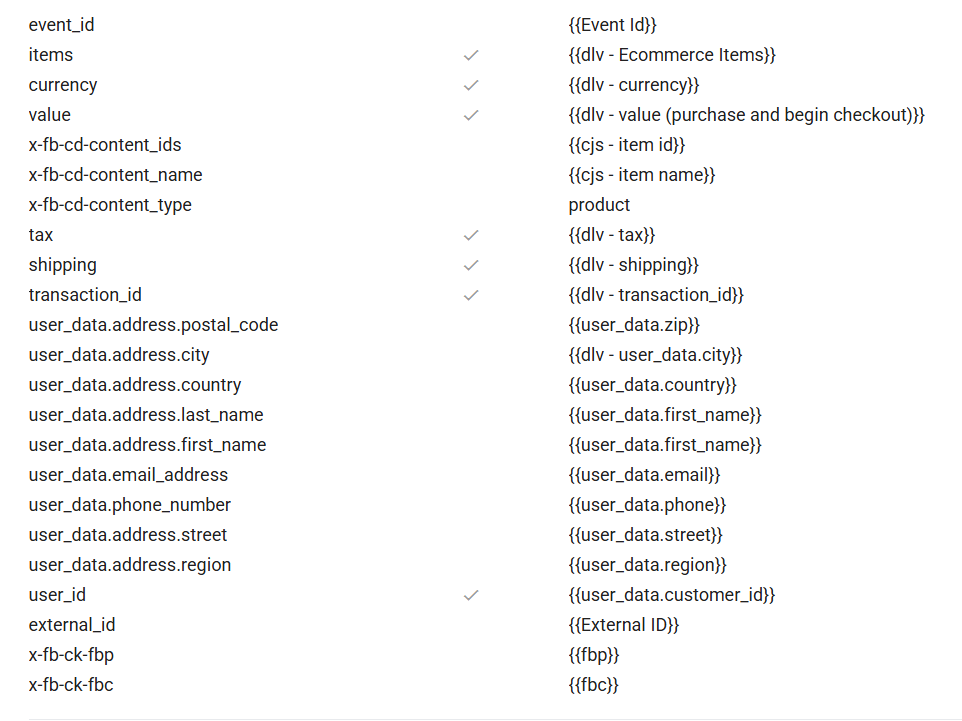
Meta CAPI tag will automatically receive all parameters.
Important: Do NOT hash fbp and fbc values. These are cookie identifiers that Meta expects in their raw format. Hashing them breaks matching.
Where the Data Comes From in Shopify
This is where most setups break down. The parameters exist. The tag is configured. But the variables pulling customer data from the data layer return empty because the data layer doesn't have them.
Here's where each piece of customer data lives in Shopify's checkout flow:
At the order_completed / purchase event:
Shopify's data layer at checkout pushes an ecommerce An object that includes the transaction details. However, customer personal data — email, phone, name, address — is in a separate part of the data layer that requires explicit access.
Specifically:
Email: Available in
checkout.email— accessible on the thank-you page data layerPhone: Available in
checkout.phone— may be empty if the customer didn't provide it at checkoutName: Available in
checkout.shipping_address.first_nameandcheckout.shipping_address.last_nameAddress fields: Available in the
checkout.shipping_addressobjectCustomer ID: Available in
checkout.customer.idfor logged-in customers
For fbp and fbc on Shopify specifically: Shopify's checkout runs in a sandboxed environment (Custom Web Pixels), which restricts direct cookie access. You need to capture _fbp and _fbc cookie values earlier in the session - before checkout begins - and either store them in the data layer or pass them through your checkout URL parameters to the thank-you page.
If your thank-you page data layer isn't populating these fields, add a custom data layer script to your Shopify checkout, or use a Shopify app that pushes enhanced checkout data to GTM.
To check what's in your data layer: open GTM Preview Mode, complete a test purchase, click on the purchase event in the event stream, and inspect the Data Layer tab. If fields are absent, that's where your EMQ score is being capped.
The Phone Number Formatting Problem
This deserves its own section because it's the most common reason phone number matching fails silently.
Meta requires phone numbers in E.164 international format:
✅
+12025551234(US number, correct)❌
2025551234(missing country code)❌
+1 (202) 555-1234(spaces and formatting characters)❌
202-555-1234(dashes, no country code)
Shopify stores the customer's phone number in whatever format they typed it. Most customers don't type it in E.164 format. This means your raw checkout.phone value almost certainly won't match Meta's requirements directly.
You have two options:
Option A: Create a GTM variable that reformats the phone number. Strip non-numeric characters, detect whether a country code is present, and add one if not. This requires a custom JavaScript variable in GTM — not complex, but requires careful handling for international stores.
Option B: Pass the phone number as-is and also pass the country field. Meta's system will attempt to normalize the phone number using the country code as context. This works reasonably well for stores with a predominantly single-country customer base.
For international stores, Option A is worth the effort. The difference between correctly and incorrectly formatted phone numbers can be 0.5–1.0 EMQ points.
What a 9+ Score Actually Requires
To consistently hit a score of 9 or above, your purchase events need to reliably include:
✅ Email (hashed, present on virtually every purchase)
✅ Phone (hashed, E.164 formatted, present on the majority of purchases)
✅ fbp cookie value (raw, not hashed — captured before checkout)
✅ fbc cookie value (raw, not hashed — especially important for ad-click traffic)
✅ First name + last name
✅ City + country (at minimum)
✅ Browser user agent (free, requires no customer data)
✅ External customer ID (for returning customers)
✅ Event ID for deduplication (not a matching signal, but required for data integrity)
Scores of 7–8 are achievable with email + phone + name alone. Getting to 9+ requires the full parameter set above, with phone formatting done correctly, fbp/fbc cookies captured, and all customer data actually populating from the data layer.
The ceiling on your score is also set by data availability. If 30% of your customers don't provide a phone number at checkout, your score will be capped regardless of configuration. In that case, work on increasing phone number collection at checkout - an SMS opt-in prompt meaningfully improves both data coverage and EMQ.
Checking Your Progress in Events Manager
After making configuration changes, wait 48 hours before checking — scores only refresh every 48 hours and stable improvements take 1–2 weeks.
In Meta Events Manager, go to Events → Purchase → Event Match Quality. You'll see the current score and a breakdown showing:
Which parameters are present
What percentage of events include each parameter
Whether each parameter is contributing positively to matching
This breakdown is your diagnostic tool. If the phone shows "low coverage," data layer population problem. If fbc shows "missing" - cookie capture isn't working. If email shows "present" but score is still low - check whether values are being passed correctly before hashing.
Also, check the Diagnostics tab on your Purchase event. Meta surfaces specific warnings here - "missing fbc," "low phone coverage," "events without matching user data" - that are more specific than anything you'd find by guessing. Read it before concluding you've fixed everything.
One More Thing: Score vs. Attributed Conversions
Event Match Quality is a means to an end, not the end itself. The end is attributed conversions - purchases that Meta successfully connects to an ad interaction.
A high EMQ score means Meta is matching your events reliably. But attribution also depends on:
Whether the matched user was exposed to your ad within the attribution window (default: 7-day click, 1-day view)
Whether the user's iOS ATT consent settings allow attribution
Whether your attribution window settings in Meta match how your customers actually buy
A score of 9 with a narrow attribution window will still miss conversions from customers who research for two weeks before buying. This isn't a tracking problem - it's an attribution model question. EMQ optimization handles the tracking side. Attribution window settings handle the rest.
Fix the score first. Then evaluate whether your attribution window needs adjusting based on your actual customer purchase cycle.
Event Match Quality isn't a vanity metric. Every point you gain translates directly into more conversions attributed, more signal for the algorithm, and better optimization of your ad spend.
The setup to get there isn't complicated. It's specific. Get every parameter mapped, get phone numbers formatted correctly, get fbp and fbc cookies flowing through, get customer data populating from your data layer - and the score follows.
If you're setting up CAPI for the first time and want a guided path to a high match quality score from day one — [start on Servero for free →]