Consent Mode v2 + sGTM: What Most Setups Get Wrong (And How to Fix It)
Your compliance dashboard shows green - but your server container is probably still sending data to users who clicked Reject. Here are the 3 mistakes breaking most sGTM consent setups.
Consent Mode v2 + sGTM: What Most Setups Get Wrong (And How to Fix It)
Here's something uncomfortable: your compliance dashboard probably shows green right now. Your consent banner appears. Users click Accept or Reject. Everything looks correct.
And your server-side GTM container is very likely still sending data for users who clicked Reject.
This isn't a rare edge case. Installing a CMP and enabling Consent Mode v2 in your web container does not automatically make your sGTM setup consent-compliant. Consent state must be explicitly propagated in the event payload - the server container has no consent signal by default.
This post covers the three mistakes that cause this, and exactly how to fix each one.
Why sGTM Makes Consent Harder Than Client-Side GTM
With regular client-side GTM, everything runs in the browser. User clicks Accept → the CMP updates consent state → every subsequent tag in the browser respects it. Simple chain, one environment.
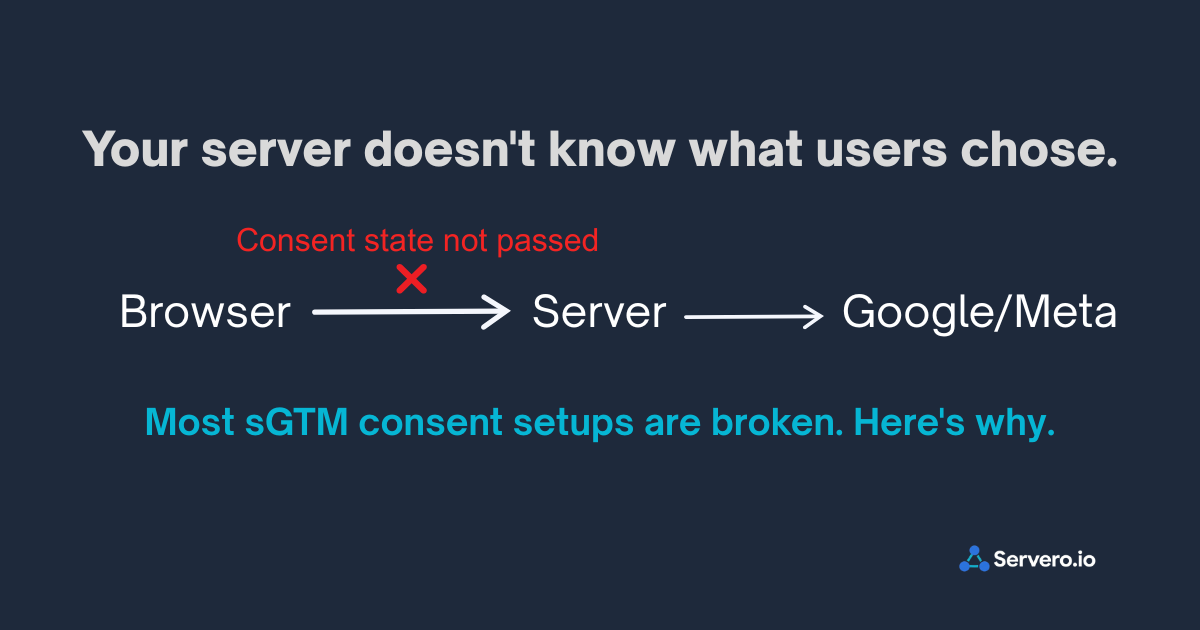
With server-side GTM, the chain breaks. The browser talks to your server. Your server talks to Google. Consent is no longer automatic - the server has no idea what the user chose unless you explicitly send it.
Your sGTM container receives GA4 events from the browser. If those events don't include the user's consent state, your server forwards them to Meta, Google Ads, and GA4 regardless of what the user chose on the banner.
That's the root cause of every mistake below.
Mistake #1: Consent State Isn't Reaching the Server Container
What it looks like: Consent signals fire correctly in your web container's debug mode. But your server container forwards events to advertising platforms for both consenting and non-consenting users - no difference in behavior.
What's happening: When Consent Mode is active in your web container, Google tags automatically add a gcs parameter (Google Consent State) to each outgoing request to your server. This parameter contains the user's current consent settings - for example, gcs=G100 where the characters encode which consent types were granted or denied.
If this parameter is absent from incoming requests in your server container, consent state never made the trip. Your server is making forwarding decisions completely blind to what the user chose.
The fix:
In GTM Preview Mode for your server container, trigger a page view or purchase event on your site. Look at the incoming request and check for the gcs parameter or x-ga-gcs header.
✅
gcs=G111— consent granted for all types✅
gcs=G100— partial consent❌
gcsabsent — consent state not reaching server
If it's absent, confirm in your web container that:
Your CMP tag is firing on the Consent Initialization trigger — not All Pages. Timing matters. Initialization fires before any other tag.
Your GA4 Configuration tag has Consent Settings enabled, requiring
analytics_storagebefore firingYour CMP supports Consent Mode v2 and is actively pushing consent state to the data layer
Mistake #2: Your Default Consent State Is Set to "Granted"
What it looks like: Everything seems to work. But users who dismiss the banner without making a choice - or who are on EU IPs before the banner loads - are being tracked as if they consented.
What's happening: Consent Mode has a default state - what it assumes before any user interaction. For EU users, this default must be denied. Many setups skip this entirely, or set it globally to granted and rely on the CMP to override it - which can fail silently.
The fix:
In your web GTM container, add a tag that fires on Consent Initialization — All Pages (not regular All Pages - timing is critical) with this code:
gtag('consent', 'default', {
  'analytics_storage': 'denied',
  'ad_storage': 'denied',
  'ad_user_data': 'denied',
  'ad_personalization': 'denied',
  'region': ['AT','BE','BG','HR','CY','CZ','DK','EE','FI',
             'FR','DE','GR','HU','IE','IT','LV','LT','LU',
             'MT','NL','PL','PT','RO','SK','SI','ES','SE',
             'GB','NO','IS','LI','CH']
});
This sets denied as the default for EU/EEA/UK/Switzerland, while leaving other regions at the global default. When the user accepts via your banner, the CMP updates to granted. Until then - denied.
Mistake #3: You're Only Passing Two of the Four Required Signals
What it looks like: Consent Mode appears to work. But Google Ads shows a "consent signal missing" warning, or your performance data quality indicator is flagged as low.
What's happening: Consent Mode v1 had two signals: analytics_storage and ad_storage. Consent Mode v2 added two more: ad_user_data and ad_personalization. Many setups upgraded from v1 and never added the new ones.
Without all four, Google treats your setup as incomplete. More practically, Google's modeled conversions for non-consented users become less accurate, which reduces the entire point of having Consent Mode.
The fix:
Make sure all four signals are present in both your default initialization and your CMP's update call:
analytics_storage← was in v1ad_storage← was in v1ad_user_data← new in v2, requiredad_personalization← new in v2, required
Check your CMP's documentation - most major platforms (Cookiebot, OneTrust, Usercentrics, Consentmanager) added v2 support in 2023–2024, but it may require updating your CMP version or toggling a specific setting, not just your GTM configuration.
After updating, verify in Google Ads → Tools → Consent → Consent Management that the signal shows green for EU traffic sources.
The Test Most People Never Run
Here's the most important thing in this post - and the thing almost every setup skips.
Most people test Consent Mode by clicking Accept and confirming that events fire. That test tells you tags work when consent is granted. It tells you nothing about whether they stop when consent is denied.
Run this test before you declare your setup compliant:
Open your site in a private/incognito window (fresh consent state, no cookies)
When the banner appears, click Reject All
Complete a test purchase
Open your server container preview
What you should see: GA4 events arriving with gcs showing denied — and no forwarding to Google Ads or Meta CAPI. Those tags should not fire.
What a broken setup shows: everything forwarding normally, as if the user never rejected anything.
Green status in GTM Preview on the Accept path confirms events fire. It does not confirm they stop. The Reject path is the one that determines actual compliance. Test it.
The CAPI-Specific Problem
If you're running Meta CAPI through your server container, there's an additional layer to handle.
Google Consent Mode only governs Google's tags. Your Meta CAPI tag in the server container operates independently - it has no awareness of Consent Mode unless you explicitly wire it.
This means: When a user declines tracking, your Google Ads and GA4 tags correctly go into modeled mode. But your CAPI tag keeps firing and sending purchase data to Meta - for a user who said no.
The fix: in your server container, add a blocking trigger to your CAPI tag. Create an Event Data variable to retrieve the consent status parameter sent to the sGTM container. If the user has not given consent, the variable will be empty, and the tag will not fire.
The exact implementation depends on how your CMP passes consent to the server, but the principle is simple: before CAPI fires, verify advertising consent is granted. If it's not - suppress the tag.
How to Verify Your Full Setup Is Working
Run all three tests. Not just one.
Test 1 — Accept All: Accept consent on a fresh incognito window. Complete a test purchase. Server container preview should show all tags firing normally - GA4, Google Ads, and CAPI.
Test 2 — Reject All (the important one): Reject consent on a fresh incognito window. Complete a test purchase. Server container preview should show GA4 events arriving - but Google Ads and CAPI tags should NOT fire. If they do, your blocking triggers aren't working.
Test 3 — Google Ads Consent Signal: In Google Ads → Tools → Measurement → Conversions → click your conversion action → look for the Consent Signal indicator. Should show green/confirmed for EU traffic. A warning here means v2 signals aren't arriving correctly.
One Honest Note
Consent Mode v2 is a required technical component - not a complete compliance answer.
Whether your overall setup is legally sound under GDPR depends on your legal basis for tracking, how your banner is designed and worded, your Data Processing Agreements, and what data you're actually collecting. Consent Mode tells Google's systems what users chose. It doesn't validate that the choice mechanism itself was lawful.
If you have significant EU traffic and genuine uncertainty about your compliance posture, the technical fixes here are the right starting point, but they're not the finish line. A DPO review is worth it at meaningful EU revenue levels.
The three mistakes above - consent not reaching the server, wrong default state, and missing v2 signals - cover the vast majority of broken setups. Fix them, run all three tests, and you'll have a setup that's technically sound and actually enforces what your users chose.
Setting up sGTM with correct Consent Mode configuration from day one — [start on Servero for free →]